
Genjutsu AI prompts
A Genjutsu prompt is not a scene description — your clip already is the scene. It is an edit note: what to change, and what you want to preserve. These are editing goals, not guarantees. Use Pro for Higgsfield Genjutsu; Standard uses other models. Below are real-render prompts, a practical formula and more than 40 examples you can load into the editor.
The prompt formula
Three short sentences cover almost every edit. The reference image does the describing, so the words only have to point at it.
- 1. Change
“Replace the dancer with the character from the reference image.”
One element, named the way it appears in the clip.
- 2. Keep
“Keep every arm and body movement and the neon-lit background.”
List what must not move: face, background, props, light.
- 3. Lock
“Keep the timing and the camera movement exactly as in the original video.”
States which shot details you want to preserve; the model can still change them.
How to write a Genjutsu prompt
- 01
Ask for one change
Swap the jacket, or move the scene to Tokyo — not both in one render. Two small edits in a row cost the same seconds as one big edit and fail far less often.
- 02
Say what stays
The model rewrites anything the prompt leaves open. If the face, the background or the product label matters, name it in a “Keep …” sentence.
- 03
Let the reference image describe the look
Upload a clear photo of the new outfit, character or product and call it “the … from the reference image”. A paragraph of adjectives is less precise than one good picture.
- 04
Name things the way they appear in the clip
“The man on the bench”, “the grey sedan”, “the bottle in her right hand” — the model has to find the element before it can replace it.
- 05
Pick footage that shows the change
A steady shot with the subject clearly visible for most of the clip beats a fast, cluttered one. Big, readable motion makes motion transfer obvious.
Prompts behind our sample renders
These produced the before/after clips on our homepage, unedited — 5-second, 480p renders made with this editor.
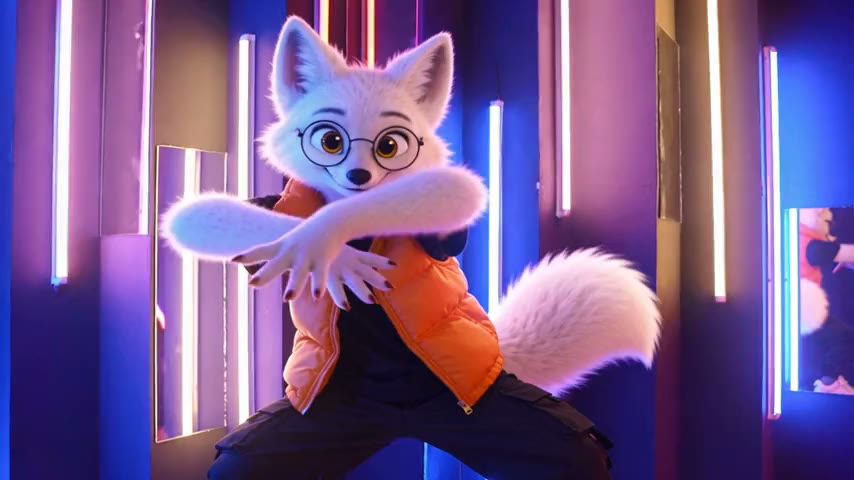
Neon dancer → 3D arctic fox
Swap“Replace the dancer with the character from the reference image. Keep every arm and body movement, the timing, the camera movement and the neon-lit background exactly as in the original video.”
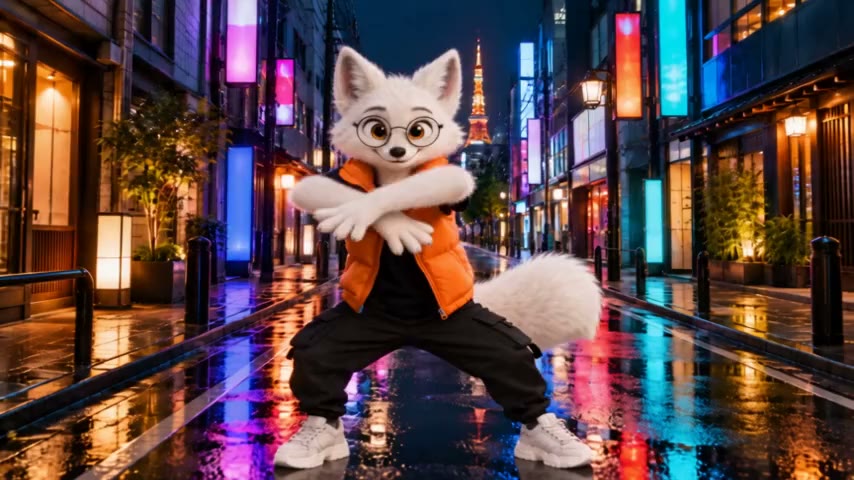
Same dance → rainy Tokyo street
Motion transfer“The character from the first reference image performs the exact same dance on the rainy neon street from the second reference image. Keep the original camera movement, framing and timing.”
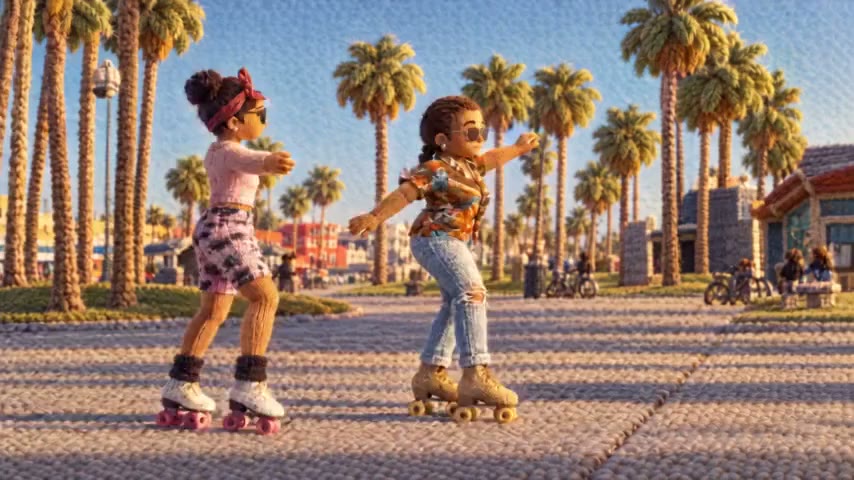
Boardwalk roller skaters → knitted yarn world
Restyle · Knitted Yarn World“Keep both skaters' moves, the palm-lined boardwalk and the camera.”
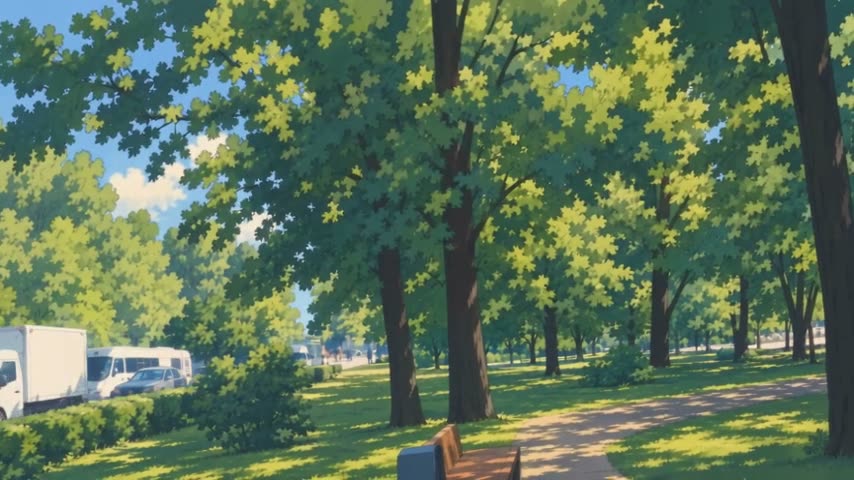
Park pan → hand-painted anime
Restyle · Hand-Painted Cel Animation“Keep the slow camera pan.”
Outfit swap prompts
Swap one garment or a whole look. Product-style photos of the clothing — flat lay or on a plain background — work best as references.
- Swap
Replace his grey hoodie with the leather jacket from the reference image. Keep his face, hair, the background and the handheld camera move.
Reference: A photo of the jacket, front view.
- Swap
Dress her in the white silk wedding gown from the reference image. Keep her walk, the timing and the slow dolly-in.
Reference: A full-length photo of the gown.
- Swap
Change his office shirt to the knitted winter sweater from the reference image. Keep his gestures, the lip-sync and the office behind him.
Reference: A photo of the sweater.
- Swap
Swap her white sneakers for the red high-top boots from the reference image. Keep every step, the street and the low tracking shot.
Reference: A side-view photo of the boots.
- Swap
Replace the dancer’s outfit with the streetwear set from the reference images: the jacket, the cargo pants and the cap. Keep the choreography and the lighting.
Reference: One photo per piece, up to three.
Character swap prompts
Put a new person, mascot or creature into the same performance. Use a full-body, front-view reference on a plain background, and avoid look-alikes of existing film or game characters — they tend to be blocked.
- Swap
Replace the man on the bench with the character from the reference image. Keep his pose, the slow head turn and the park background.
Reference: A full-body, front-view image of the character.
- Swap
Turn the dancer into the chrome humanoid robot from the reference image. Keep the same choreography, the timing and the club lighting.
Reference: A full-body image of the robot.
- Swap
Replace the presenter with the 3D cartoon host from the reference image. Keep the hand gestures, the lip-sync and the studio set.
Reference: A waist-up image of the host facing the camera.
- Swap
Swap the runner for the knight in silver armor from the reference image. Keep the stride, the camera tracking alongside and the forest trail.
Reference: A full-body image of the knight.
- Swap
Replace the skateboarder with the character from the reference image. Keep every trick, the board, the skate park and the fisheye camera.
Reference: A full-body image of the character.
Animal and creature prompts
Animals are the safest swaps: no likeness issues, and four-legged motion transfers well onto another four-legged animal.
- Swap
Replace the dog with the red fox from the reference image. Keep the run across the lawn and the low camera following it.
Reference: A side-view photo of a fox.
- Swap
Turn the cat on the sofa into the small dragon from the reference image. Keep its stretch, the sofa and the window light.
Reference: An image of the dragon, roughly cat-sized.
- Swap
Replace the horse with the white unicorn from the reference image. Keep the gallop, the rider, the beach and the sunset light.
Reference: A side-view image of the unicorn.
- Swap
Swap the pigeon on the ledge for the green parrot from the reference image. Keep the head bobs and the city behind it.
Reference: A photo of the parrot.
Product and ad prompts
Film one handheld product shot, then swap in each product or flavour. Packshot photos on a white background make the cleanest references — and say where the label faces.
- Swap
Replace the water bottle in her hand with the product from the reference image. Keep her grip, the label facing the camera, her face and the gym background.
Reference: A packshot of your product.
- Swap
Replace the coffee mug she picks up with the soda can from the reference image. Keep her hand movement, the kitchen and the morning light.
Reference: A packshot of the can, label forward.
- Swap
Replace the runner’s shoes with the sneakers from the reference images. Keep the running motion, the slow-motion timing and the track.
Reference: Side and three-quarter photos of the sneaker.
- Swap
Swap the phone he is holding for the phone from the reference image. Keep the screen facing the camera, his thumb movement and the café background.
Reference: Front and back photos of the phone.
- Swap
Replace the perfume bottle on the turntable with the bottle from the reference image. Keep the rotation speed, the reflections and the black backdrop.
Reference: A packshot of the bottle.
Vehicle and object prompts
Cars, bikes and furniture swap cleanly when they stay in frame for most of the clip.
- Swap
Replace the grey sedan with the cherry-red vintage convertible from the reference image. Keep the camera pan and the people walking by.
Reference: A three-quarter photo of the car.
- Swap
Swap the bicycle for the electric scooter from the reference image. Keep the rider, the turn at the corner and the street.
Reference: A side-view photo of the scooter.
- Swap
Turn the white delivery van into the food truck from the reference image. Keep its speed, the road and the drone shot following it.
Reference: A photo of the food truck.
- Swap
Replace the wooden coffee table with the marble table from the reference image. Keep the cups on it, the living room and the slow push-in.
Reference: A photo of the table.
Location, weather and time-of-day prompts
Keep the person, change the world around them. Use a photo of the target place or weather as the reference. These are harder than a single-object swap, so start at 480p and keep the clip short.
- Swap
Replace the background with the rainy neon street from the reference image: wet asphalt, reflections, light drizzle. Keep the person, the walk and the camera move.
Reference: A photo of a rainy street at night.
- Swap
Replace the office behind the speaker with the sunlit terrace from the reference image. Keep the speaker, the lip-sync and the framing.
Reference: A photo of the terrace from roughly the same angle.
- Swap
Change the sunny park into the snowy park from the reference image, with snow falling. Keep the people, their movement and the camera pan.
Reference: A photo of a snowy park.
- Swap
Move the skateboarder to the Tokyo plaza at dusk from the reference image. Keep his tricks and the tracking shot.
Reference: A photo of the plaza.
- Swap
Turn the midday beach into the golden-hour beach from the reference image, with a low warm sun and long shadows. Keep the swimmers and the waves.
Reference: A photo of the beach at sunset.
Motion transfer prompts
Motion transfer keeps only the movement of your clip and gives it to a new character — optionally in a new place. The first reference image is the character; a second can set the scene.
- Motion transfer
The character from the reference image performs this exact dance. Keep the original camera movement, framing and timing.
Reference: A full-body image of the character.
- Motion transfer
The character from the first reference image performs the same moves in the desert canyon from the second reference image. Keep the camera movement and timing.
Reference: The character first, then a photo of the canyon.
- Motion transfer
The robot from the reference image does this workout, rep for rep, in the same gym. Keep the camera angle.
Reference: A full-body image of the robot.
- Motion transfer
The plush toy character from the first reference image walks and waves exactly like the person in the clip, on the city sidewalk from the second reference image.
Reference: The plush character first, then a photo of the sidewalk.
- Motion transfer
The anime-style martial artist from the reference image performs this exact fight choreography on a rooftop at night. Keep every kick, the timing and the handheld camera.
Reference: A full-body image of the character.
Restyle prompts
Restyle changes the look of the whole frame using one of 20 preset styles. The prompt is optional — use it to protect what matters, like a hair colour or the camera move.
- RestyleCel-Shaded CG Anime
Keep her pink hair, the camera move and the timing.
- RestyleFelt Puppet Stop Motion
Keep the two people, their gestures and the layout of the kitchen.
- RestyleRetro Game 3D
Keep the runner’s stride and the side-on tracking camera.
- RestyleRounded Toy CGI
Keep the kids’ movements and the playground.
- RestyleNighttime Anime Pixel Art
Keep the street, the passing cars and the slow pan.
- RestyleExpressive Gouache Fashion
Keep the runway walk, the colours of the outfit and the camera.
- RestyleChunky Textured Low-Poly
Keep the hiker, the mountain ridge and the drone orbit.
Common prompt mistakes
Most wasted renders come from one of these four. Each fix is a rewrite of the same idea.
Too vague
- Instead of
- Make him look cooler.
- Write
- Replace his grey hoodie with the leather jacket from the reference image. Keep his face and the background.
Too many changes at once
- Instead of
- Turn him into a robot, move him to Mars, make it night and make it anime.
- Write
- Render 1 (Swap): replace him with the robot from the reference image. Render 2 (Restyle): apply an anime style to the result.
Describing what a reference image could show
- Instead of
- Replace her with a fox with orange fur, green eyes, a blue vest, white sneakers and…
- Write
- Replace her with the character from the reference image. Keep her dance and the lighting.
Forgetting what must stay
- Instead of
- Change her dress to red.
- Write
- Change her dress to the red dress from the reference image. Keep her face, her hair, the walk and the camera move.
Genjutsu prompt FAQ
It is the short instruction you give the Genjutsu video-to-video model along with your clip: what to change and what to keep. Unlike a text-to-video prompt, it does not describe the whole scene — the uploaded video already provides the motion, framing and timing.
One to three sentences. Name the element to change, point to the reference image for the new look, and list what must stay. Longer prompts rarely help and often introduce changes you did not ask for.
For Swap and Motion transfer, yes — at least one, up to eight. The image defines the new outfit, character, product or place far more precisely than words. Restyle works without one; reference images there only help keep characters consistent in the new style.
No. Picking one of the 20 preset styles is enough to render. Add a short “Keep …” sentence when a detail matters, such as a hair colour, a logo or the camera move.
No. Higgsfield has not published the prompts behind its own examples. The prompts on this page are written by us for the same model and follow what worked in our own renders; the ones in “Prompts behind our sample renders” are exactly what we used.
The model is free to rewrite anything the prompt does not protect. Add it to the “Keep …” sentence, ask for one change per render, and use a reference image instead of a long description.
Requests involving real people without consent, public figures, minors, sexual content and well-known copyrighted characters are blocked by our filters or the model’s moderation. Blocked renders are refunded automatically.
Try a prompt on your own clip
The $4.99 trial pack covers one 5-second Pro (Genjutsu) render at 480p, or two 5-second Standard Swaps.